
Built the tool I actually use
Built a full-stack, multi-user AI-powered job application assistant that automates the entire job application workflow — from analysing job fit and generating tailored resumes and cover letters, to tracking every application from first click to job offer. Designed, prompted, and shipped in 19 hours during the Replit Buildathon. Powered by Claude AI.
🔗 Live App: https://hirithm-ai–databyrose.replit.app/
🐙 GitHub: https://github.com/DatabyRose/Hirithm-AI
Problem / Objective
Job hunting is time-consuming, repetitive, and increasingly competitive. Most job seekers send the same generic resume and cover letter to every role — not because they want to, but because tailoring each application properly takes hours. The tools that exist to help with this charge $40 a month or more, which is a painful cost for someone who is already between jobs and watching every dollar.
As someone in the middle of my own job search, I had developed a manual workflow — ChatGPT open in one tab, my resume in another, tracking applications in a spreadsheet that always felt one step behind. It worked. But it was slow, disconnected, and exhausting.
The objective was to build a smarter, faster, and more accessible alternative — one that:
- Learns who you are from your existing resume and career materials
- Analyses any job description against your profile instantly
- Generates a career-strategist-level tailored resume and cover letter in seconds
- Tracks every application in one organised workspace
- Stays affordable enough that anyone can use it
Data Source and Scope
- User input: Master resume (PDF or DOCX), GitHub profile, LinkedIn PDF export, personal info, career achievements, skills, and job search preferences — collected once during onboarding and saved permanently
- Job data: Any job description pasted from any job board — LinkedIn, Indeed, company websites
- AI processing: Claude API (Anthropic) reads the user profile and job description together to generate all outputs
- Scope: Full end-to-end workflow — job analysis, resume generation, cover letter generation, DOCX export, application tracking, email notifications, and admin management
Tools and Tech Stack
- Claude API (Anthropic) — AI engine for job scoring, resume writing, cover letter generation
- Node.js + Express — Backend API and server
- React + Recharts — Frontend interface and analytics charts
- PostgreSQL 16 — Database for user profiles, applications, and generated documents (managed by Replit)
- Clerk — Secure user authentication and session management
- Resend — Automated email notifications
- Stripe — Payment integration (Phase 4)
- GitHub Public API — Pulls user projects automatically during onboarding
- docx npm package — Generates properly formatted Word documents server-side
- Replit — Development environment, hosting, and deployment
What I Built
A fully working, multi-user web application with the following structure:
Landing Page and Authentication
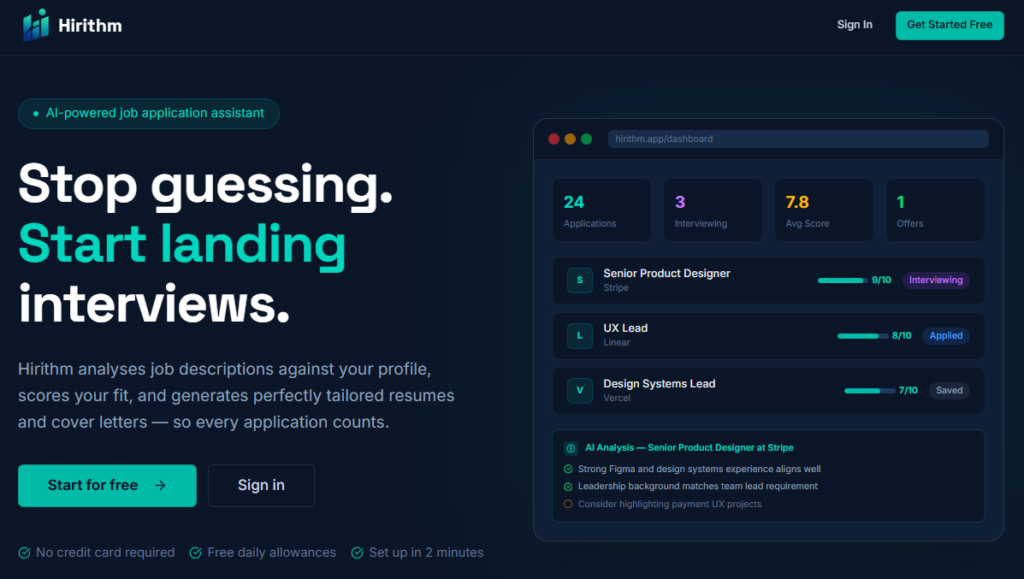
Branded landing page with feature highlights and clear calls to action. Secure signup and login via Clerk — supporting email/password and Google OAuth. Each user sees only their own data.
![Hirithm landing page — dark navy background, teal headline "Land the job with AI precision", Get Started and Sign In buttons]](https://rosetorres.site/wp-content/uploads/2026/05/Hirithm-Landing-1-1024x579.png "Hirithm Landing")
5-Stage Profile Onboarding
A guided setup that collects everything the AI needs to know about the user — completed once and saved permanently to their profile.
- Stage 1 — Upload master resume (PDF/DOCX), GitHub URL, Portfolio URL, LinkedIn URL. GitHub scan pulls projects automatically. LinkedIn PDF import extracts experience automatically.
- Stage 2 — Personal info: name, location, email, phone, target roles, work preferences
- Stage 3 — Career background: years of experience, industries, education, certifications, career breaks
- Stage 4 — Skills and achievements: top accomplishments with metrics, tools, languages, awards
- Stage 5 — Job search preferences: target salary, company size, industries of interest, deal-breakers
![Profile page showing master resume uploaded, personal info fields filled, target roles added as tags]](https://rosetorres.site/wp-content/uploads/2026/05/My-Profile.png "My Profile page Form")
Job Fit Analyser
User pastes any job description. Hirithm analyses it against the full user profile and returns:
- Match score from 1–10 (displayed prominently)
- Why you fit — specific bullet points matching experience to requirements
- Your gaps — honest identification of missing skills or experience
- Gap follow-up — text field asking if the user has gap experience not captured in their resume. This context feeds directly into resume generation.
[IMAGE PLACEHOLDER: Job analysis result showing score 8/10, Why You Fit section, Gaps section, and gap follow-up text area]
Resume Builder
Before generating, the user selects:
- Resume length — 1 page or 2 pages
- Professional summary length — 3, 4, or 5 sentences
Hirithm then generates a complete tailored resume with these sections in order:
- Professional Summary — written at career-strategist level, targeted to the role
- Career Highlights — impact bullets each starting with a strong 2–3 word keyword
- Areas of Expertise — 10–15 keywords matched to the job description
- Work Experience — Job Title | Company | Period, 2–3 line role overview, 3–4 metric-driven impact bullets per role
- Project Experience — 2–3 best projects with measurable outcomes and 2+ impact bullets each
- Technical Skills — categorised list of 5–6 bullet groups tailored to the role
- Education and Certifications — included only when relevant
The resume is displayed in a clean white document preview on the right side of the screen. Download generates a properly formatted DOCX file named firstname_jobtitle_company_resume.docx.
[IMAGE PLACEHOLDER: Side-by-side view — options panel on left, white resume preview on right showing all sections cleanly formatted]
[IMAGE PLACEHOLDER: Downloaded DOCX resume showing professional summary, career highlights with bold keywords, and work experience with metric-driven bullets]
Cover Letter Builder
Before generating, the user selects a style:
- Option A — Full paragraphs (traditional format)
- Option B — Keyword-first bullet points (4–5 bullets, each starting with a bold keyword followed by 1–2 lines of business impact)
Both styles include:
- Proper header with user contact details
- Addressed to hiring manager if named in the job description
- Maximum 1 page
- Application Tips section — scans the job description for hidden submission requirements, special instructions, deadlines, and trick questions the applicant must not miss
Download generates a DOCX file named firstname_company_coverletter.docx.
[IMAGE PLACEHOLDER: Cover letter displayed on screen in bullet point style, showing keyword-first bullets and Application Tips section below]
Application Tracker
Every application is saved automatically when a resume is generated. The tracker includes:
- Kanban board with columns: Saved → Applied → Interviewing → Offer Received → Rejected → Completed
- Each card shows company, role, match score, and date of last status update
- Application detail view stores: date applied, salary range, hiring manager contact, job board source, job description summary, and notes — all editable
- Full document history — every resume and cover letter generated for that job is saved and re-downloadable anytime
- Timestamped status changes
[IMAGE PLACEHOLDER: Kanban board showing application cards across multiple status columns with match scores and company names visible]
My Insights Dashboard
Personal analytics dashboard showing:
- Application pipeline funnel (Saved → Applied → Interviewing → Offer)
- Match score distribution across all analysed jobs
- Most common skill gaps appearing across multiple job analyses
- Application activity timeline over the last 12 weeks
- Top industries and companies targeted
- Personal best stats — highest score, current streak, total documents generated
[IMAGE PLACEHOLDER: Insights dashboard showing pipeline funnel chart, skill gaps ranked list, and activity timeline chart]
Email Notifications (7 automated types)
- Welcome email on signup
- Profile incomplete reminder (24 hours after signup if no resume uploaded)
- First application encouragement
- 14-day follow-up reminder if application status hasn’t changed
- Interview congratulations when status moves to Interviewing
- Weekly summary every Monday with application stats
- Offer received congratulations
All templates are editable from the admin panel without touching code.
[IMAGE PLACEHOLDER: Email template manager in admin panel showing all 7 templates with active toggles and edit buttons]
Admin Control Panel
A private developer dashboard at /admin (password protected) with full control over:
- Overview stats — total users, active today, API calls, estimated daily cost
- User management — activate, deactivate, reset daily limits, invite new users
- Usage limits — editable numbers for job analyses, resumes, and cover letters per user per day
- API spending tracker — daily cost chart, monthly total, progress bar toward spending cap
- Activity log — every action across all users with timestamp and detail
- Email template manager — edit subject lines and body content for all 7 email types, send test emails, toggle templates on/off globally
- Announcements — broadcast a message to all users as a banner
- Maintenance mode toggle
- Settings — admin password, invite-only mode, max user cap
[IMAGE PLACEHOLDER: Admin panel overview showing stat cards, user management table, and sidebar navigation]
Key Outcomes
- Shipped a fully working, deployed, multi-user web application in 19 hours — first full app ever built
- Generated a real tailored resume and cover letter for a Scotiabank job posting using the app — output was ready to submit
- Demonstrated that a non-developer with domain knowledge and the right AI tools can build production-grade software
- Built all security, scalability, and usability requirements from first principles — informed by a background in business analysis and software requirements
- Created a practical tool that is already being used in a real job search
How Hirithm Supports the Job Search Process
Before Hirithm, the workflow was: open ChatGPT, paste job description, ask for tailored resume, copy output, format manually in Word, repeat for cover letter, log everything in a spreadsheet. It worked — but it took hours per application and nothing connected together.
After Hirithm, the same workflow takes minutes:
- Profile is already saved — no re-entering information
- Job analysis gives a go/no-go signal before any time is invested
- Resume and cover letter are generated in seconds with options chosen upfront
- Every application is tracked automatically with all details in one place
- Email reminders ensure no application goes cold without a follow-up
- Insights show patterns over time — which skills to develop, which industries to focus on
The result is a smarter, faster, and more organised job search — with stronger, more targeted applications at every step.
Role and Skills Demonstrated
Role: Full-Stack AI Application Builder / Product Designer
- Defined the full product requirements, user flow, and feature scope from scratch
- Directed Replit Agent using plain-English prompts to build all frontend, backend, database, and AI integration code
- Designed the complete user experience — onboarding flow, resume structure, cover letter styles, tracker, admin panel
- Engineered AI prompts for job scoring, resume generation, and cover letter generation using Claude API
- Implemented security controls — authentication, per-user limits, encrypted secrets, admin access
- Managed the full build lifecycle from concept to deployed live product in 19 hours
Skills demonstrated:
- AI product design and prompt engineering
- Full-stack application architecture (Node.js, React, PostgreSQL)
- Claude API integration and AI workflow design
- User experience design and onboarding flow design
- Database schema design for multi-user applications
- Security and access control implementation
- Admin panel and developer tooling design
- Resume writing strategy and hiring best practices
- Project delivery under time constraint
Tags
AI app, Claude API, Anthropic, resume builder, cover letter generator, job search tool, job application assistant, ATS-friendly resume, career tool, full-stack web app, Node.js, React, PostgreSQL, Clerk authentication, Replit, buildathon, vibe coding, prompt engineering, AI product, job tracker, career strategist, data analyst portfolio, portfolio project, built in public